
 Sixth Day Studios
SDS-ZIP
LiveA free archive manager for Windows. It opens ZIP, RAR, 7z and the rest, with no ads or nag screens.
Free. About 12 MB, with no admin prompt.
Faster than WinRAR, 7-Zip and WinZip
The same 49,782 files (2.16 GB) on the same PC. Shorter is better.
Unpacking a ZIP 2.3× faster
- SDS-ZIP18.7 s
- WinRAR43.2 s
- 7-Zip44.5 s
- WinZip60.6 s
Making a ZIP 3.9× faster
- SDS-ZIP11.4 s
- 7-Zip43.9 s
- WinRAR54.3 s
- WinZip108.4 s
How we tested
"Faster" compares SDS-ZIP with the next-quickest app. SDS-ZIP, 7-Zip 26.05 and WinRAR 7.01 are the median of three runs. WinZip 77.2 is one run, with its start-up time left out. Each app used its default compression, on a 16-core Ryzen 9 5950X, in November 2026.
What it does
- It opens what WinRAR and WinZip open: ZIP, RAR and RAR5, 7z, TAR, GZ, BZ2, XZ, ZST, ISO, CAB, ARJ, LZH, WIM, split volumes and self-extracting files.
- There's no account to make, and no ads or upsell. Nothing ever pops up asking for money.
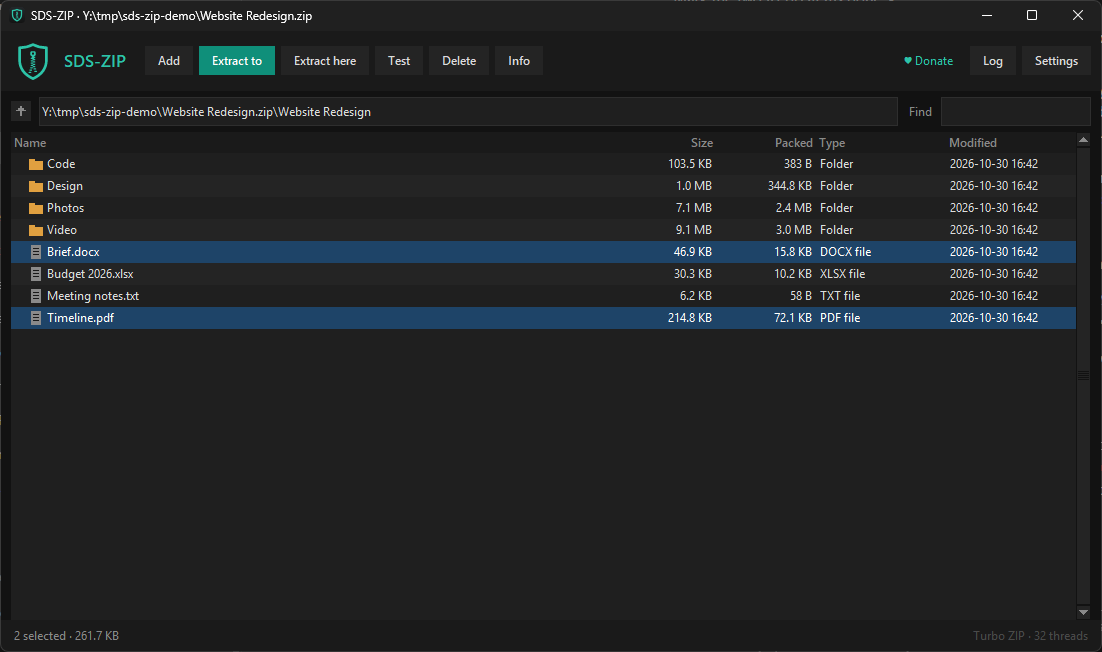
- Browse an archive like a folder, search it with Find, and double-click any file to open it (an archive inside an archive opens too).
- Extract everything or just what you pick, here, to a folder of its own, or anywhere you choose. Skip, overwrite or keep both when a file is already there. Select several archives and they unpack side by side.
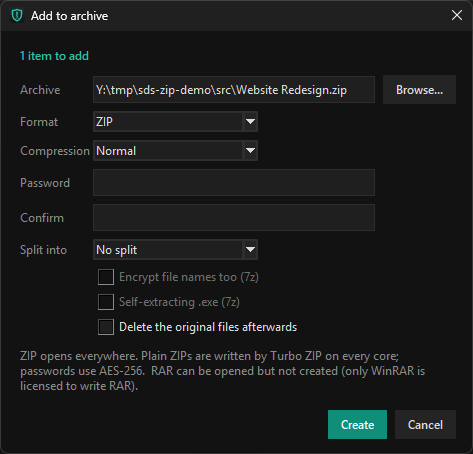
- Make ZIP, 7z, TAR, TAR.GZ, TAR.BZ2, TAR.XZ and TAR.ZST archives, from Store to Ultra compression.
- Passwords use AES-256 for ZIP and 7z, and 7z can hide the file names too.
- Split an archive into 100 MB, CD, FAT32 or DVD sized parts, or make a 7z that unpacks itself.
- Edit ZIP, 7z, TAR and WIM archives without unpacking them, by adding, deleting and renaming files inside.
- Test an archive for damage without writing anything.
- The Explorer right-click menu has Extract here, Extract to its own folder, Add to archive and Add to ZIP. Drag files onto the window to add them, or drag files and folders out of an archive into any folder.
- AI agents such as Claude can use it too. SDS-ZIP has a built-in MCP server, so an agent can list, test, extract and make archives for you. Settings copies the setup command, and a read-only switch lets agents look without changing anything.
- The error log is simple. Problems show in the status bar and a Log panel you can copy, never in a pile of popups.
Turbo ZIP
Most archive tools unpack a ZIP one file at a time. SDS-ZIP's own ZIP engine works on many files at once, one per CPU core, and makes ZIPs the same way, splitting big files into pieces so no single file holds things up. The chart near the top of this page shows the difference on 49,782 files, and the ZIP it made came out about the same size as WinRAR's. The ZIPs are standard, so anyone can open them. Everything else (RAR, 7z, ISO and the rest) runs on the 7-Zip engine, built in.
RAR support and Windows notes
- RAR is open-only. Only WinRAR is licensed to make RAR files, so SDS-ZIP opens and extracts them but makes ZIP or 7z instead.
- It runs on your PC only. Nothing is uploaded, and there are no accounts.
- It runs on 64-bit Windows 10 and 11. It isn't code-signed yet, so Windows may say "Windows protected your PC". Choose More info, then Run anyway.
- On Windows 11, the right-click entries sit under "Show more options".
- The 7-Zip engine is open source, by Igor Pavlov, under the GNU LGPL. Its licence is in the install folder.
- Privacy details are in the privacy policy.
Free to use
If SDS-ZIP saved you time, you can chip in to keep it going. It's up to you, and it works the same either way.